Claude, built by Anthropic, has become one of the most popular AI assistants for professionals, especially among writers, analysts, and developers. It is known for handling very long documents, producing careful and natural writing, and performing strongly at coding and complex multi-step work. Like other assistants, though, Claude now comes in several models and plans, and choosing the right combination makes a big difference to both results and cost. This guide explains Claude’s current models, which one is best for each type of task, what each plan includes, and how to get the most out of Claude for your business.
Model names and plan details in this guide reflect Anthropic’s lineup as of October 2026 (updated October 8 with the release of Claude Haiku 5.5). Anthropic updates Claude regularly, so check the model selector and the official pricing page for the latest details.
The Current Claude Models Explained
Anthropic organizes its models into families that trade off capability, speed, and cost. According to Anthropic’s models overview, the current lineup includes four main models.
Claude Opus 5.5: The Recommended All-Rounder
Released on September 22, 2026, Opus 5.5 is the model Anthropic recommends as the starting point for most work. It is designed for complex knowledge work and long-running coding and agent tasks, and TechCrunch reported that Anthropic describes it as its strongest-performing model tested to date, matching or beating its larger Fable model on many benchmarks while running faster and costing less. Anthropic also highlights clearer answers with less jargon and the most important information placed first. Opus 5.5 supports a context window of up to one million tokens, enough to work with several long reports or a large codebase at once.
Claude Fable 5.1: Maximum Reasoning
Fable 5.1 is Anthropic’s largest model, intended for the most demanding reasoning and very long, complex agentic projects. It is also the most expensive to run, so it makes sense only when Opus 5.5 falls short. For most small businesses, Opus will be the better everyday choice.
Claude Sonnet 5.5: The Balanced Workhorse
Sonnet 5.5 offers the best balance of speed and intelligence. It handles writing, analysis, summarizing, and most coding tasks very well, responds faster than the larger models, and costs considerably less to use through the API. It is a strong default for high-volume everyday work.
Claude Haiku 5.5: Fast and Affordable
Released on October 7, 2026, Haiku 5.5 is the fastest and cheapest model in the lineup, and a big step up from Haiku 4.5. Through the API it costs from $0.10 per million input tokens and $0.50 per million output tokens, supports a one-million-token context window, and adds an adjustable effort setting. It is ideal for high-volume tasks such as classifying messages, extracting data from documents, short replies, or powering a customer service chatbot where speed and cost matter more than deep reasoning. Pricing details and benchmarks are in the Claude Haiku 5.5 section further down.
Extended Thinking
Claude’s larger models can “think” before answering, working through a problem step by step. Anthropic’s newer models use adaptive thinking, adjusting how much reasoning they do to the difficulty of the task. For analysis, planning, math, and code, this produces noticeably more reliable answers.
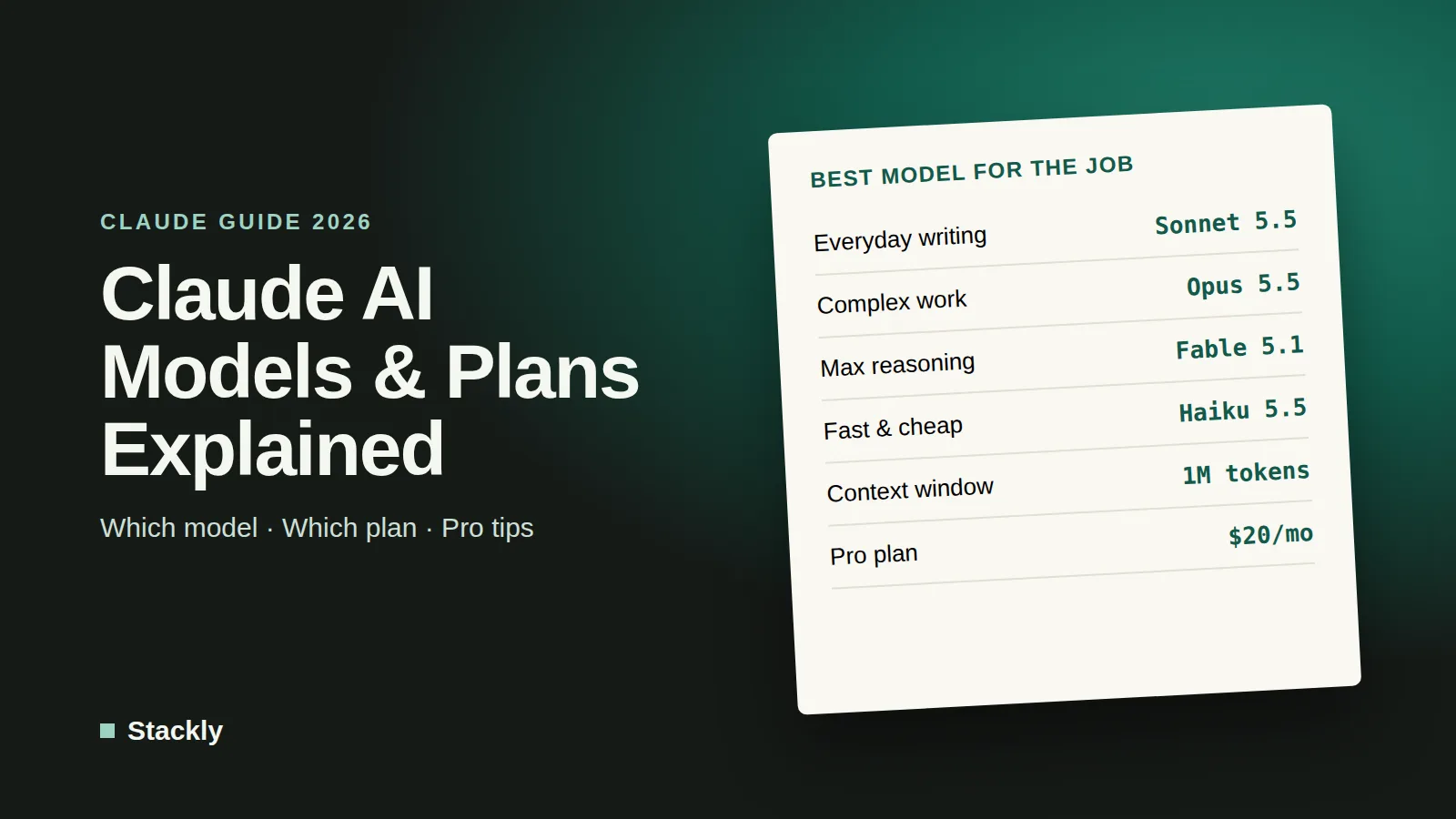
Which Claude Model Is Best for Each Task?
Task
Recommended model
Why
Everyday writing, emails, summaries
Sonnet 5.5
Fast, high-quality writing at a lower cost
Long reports, contracts, research documents
Opus 5.5
Large context window and careful, well-structured output
Coding, websites, automation scripts
Opus 5.5 (Sonnet 5.5 for simpler tasks)
Anthropic’s strongest model for agentic coding
Complex strategy, multi-step analysis
Opus 5.5 with extended thinking
Deeper reasoning and better planning
Very hard, long-running problems
Fable 5.1
Maximum reasoning when other models fall short
High-volume simple tasks, chatbots
Haiku 5.5
Fastest response and lowest cost
In the Claude apps, paid plans let you switch models from the model selector. A simple rule: use Sonnet for speed, Opus for anything important or complex, and Haiku when building automated tools that process large volumes.
Claude Plans and Pricing in 2026
Anthropic currently offers the following plans. Prices are shown in US dollars and may differ by country; always confirm on the official pricing page.
Free ($0): Access on web, desktop, and mobile, with web search, file creation, code execution, memory, app integrations, and artifacts, subject to usage limits. A good way to try Claude.
Pro ($20 per month, or $17 per month billed annually): Much more usage, access to multiple models including Opus, Projects, Claude Code for software work, and Anthropic’s newer tools for documents, slides, and design, plus extensions for Chrome and Microsoft 365. The best value for most freelancers and small business owners.
Max (from $100 per month): Five or twenty times the usage of Pro, higher output limits, and priority access at busy times. Designed for people who rely on Claude for many hours each day.
Team (from about $20 to $25 per seat per month): A shared workspace with central billing, single sign-on, admin controls, and search across your organization’s connected tools.
Enterprise (custom pricing): Advanced security and compliance features such as audit logs, SCIM, custom data retention, and role-based access.
Developers and businesses building their own tools can also use Claude through the API, which is priced per million tokens processed. At the time of writing, Haiku 5.5 is the cheapest option, from $0.10 per million input tokens, and Fable 5.1 the most expensive, with Sonnet 5.5 and Opus 5.5 in between.
Which plan should you choose? Occasional users can stay on Free. If you use Claude every day for writing, analysis, or code, Pro is usually worth it. Choose Max only if you regularly hit Pro’s usage limits, and Team as soon as colleagues share client or company information.
Key Claude Features Worth Using
Projects. Projects let you store documents, instructions, and background information for a client, product, or area of your business. Every chat inside the project uses that knowledge, so you do not have to re-explain context.
Artifacts. When Claude creates something substantial, such as a document, a web page, a chart, or a small interactive tool, it appears in a separate panel where you can view, edit, and reuse it.
Very long context. Claude can read and compare long reports, contracts, transcripts, or entire websites in a single conversation, which makes it excellent for reviewing and summarizing large amounts of text.
Web search and research. Claude can search the web for current information and cite its sources, and its research mode investigates a question across many sources before writing a detailed answer.
Integrations. Claude can connect to tools such as email, calendars, cloud storage, and project management apps, so it can find information and complete tasks across the software you already use.
Claude Code. Anthropic’s coding tool lets Claude read, write, and test code across an entire project. It is widely used by developers and is useful for small businesses maintaining websites or internal tools.
Cowork and browser agents. On paid plans, Claude can work more independently on multi-step tasks, such as organizing files, filling in documents, or working through web pages with its Chrome extension, while you review the results.
Memory. Claude can remember relevant details and preferences across conversations, and you can review or turn off memory in settings.
How to Get the Most Out of Claude
Write Clear, Detailed Prompts
Anthropic’s prompt engineering guide recommends treating Claude like a brilliant new colleague who lacks context about your business. In practice, that means:
Explain the goal and the audience. Tell Claude what you are trying to achieve and who will read the result.
Be explicit. Specify length, tone, format, and anything you want included or avoided.
Give examples. Paste examples of writing or formats you like so Claude can match them.
Structure long inputs. When sharing several documents, label them clearly, and place long documents before your question.
Ask for reasoning when it matters. For complex decisions, ask Claude to think through the options before giving a recommendation.
Use Projects for Recurring Work
If you regularly write for the same brand, manage the same clients, or answer the same types of questions, set up a Project with your brand guidelines, product information, and style examples. The quality and consistency of Claude’s output improve dramatically when it has the right reference material.
Let Claude Handle Long Documents
Claude’s large context window is one of its biggest advantages. Upload a contract and ask for a plain-language summary of obligations and deadlines, or upload several supplier quotes and ask for a comparison table. Always double-check critical details against the original.
Match the Model to the Task
Using the most powerful model for every task wastes usage limits. Draft and summarize with Sonnet, switch to Opus for important documents, analysis, and code, and keep Fable for exceptional cases.
Verify and Protect
Like all AI assistants, Claude can make mistakes, so check facts, figures, and anything legal or financial. On consumer plans, you can choose in your privacy settings whether your chats may be used to improve Anthropic’s models, while conversations on Team, Enterprise, and API plans are not used for training by default. Keep passwords and sensitive customer data out of chats, and follow our website security checklist to protect the accounts connected to AI tools.
Practical Ways Small Businesses Use Claude
Content and marketing: Writing blog posts, newsletters, and website copy with a consistent brand voice. Our guide to the best AI writing tools compares Claude with other options.
Documents and admin: Summarizing contracts, drafting proposals, and turning meeting notes into action lists.
Customer support: Drafting replies or powering a support assistant with a fast model such as Haiku; see our guide to AI chatbots for small business.
Websites and code: Building landing pages, fixing WordPress issues, or writing automation scripts with Claude Code.
Workflow automation: Connecting Claude to the tools you use every day, as described in our guide to AI productivity apps.
Claude vs ChatGPT
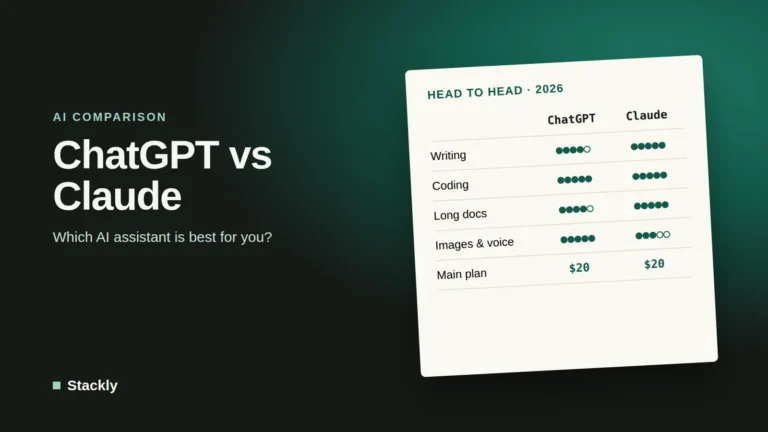
Both assistants are excellent, and many professionals use both. Claude stands out for long documents, natural writing, and coding, while ChatGPT offers a very broad feature set, including built-in image generation and custom GPTs. Read our guide to ChatGPT’s models and plans for a detailed look at the alternative, and our overview of the state of AI in 2026 for the bigger picture.
Haiku 5.5 is the model to look at if price and speed matter more than raw intelligence, which is the case for most automations and customer-facing chat. Here is what is new, how small businesses can use it, and where it falls short.
The headline change is cost. For prompts up to 100,000 tokens, which Anthropic says covered about 90% of Haiku 4.5 requests, Haiku 5.5 costs $0.10 per million input tokens and $0.50 per million output tokens, a tenth of Haiku 4.5’s list price. Longer prompts cost five times more, at $0.50 and $2.50. Anthropic estimates that Haiku 5.5 costs around 75% less to run on average than its predecessor.
There is one catch worth knowing. Haiku 5.5 uses an updated tokenizer that produces somewhat more tokens for the same text. Developer Simon Willison measured roughly 1.25 times as many tokens as Haiku 4.5 for a long prompt, so real savings are a little smaller than the list prices suggest, but still very large.
A Big Jump in Capability
Anthropic reports dramatic improvements over Haiku 4.5 on its benchmarks, including:
Benchmark (Anthropic-reported)
Haiku 5.5
Haiku 4.5
Sonnet 5.5
GDPval-AA v2.1 (real-world professional tasks)
1620
735
1840
OSWorld 2.1 offline subset (computer use)
72.4%
15.7%
Not reported
Humanity’s Last Exam, with tools
57.4%
18.7%
Not reported
Terminal-Bench 4.0 (command-line tasks)
39.2%
0.0%
Not reported
In plain terms, the new Haiku is no longer just a fast model for simple jobs. It can handle professional writing, research, and multi-step tasks that previously needed a larger model, while still trailing Sonnet 5.5 on the hardest work. Business customers quoted at launch reported concrete gains: Asana cited more than 30% lower latency for task completions, and HubSpot said Haiku 5.5 achieved the best score it had seen on its simulated CRM task suite.
Adjustable Effort
Haiku 5.5 is the first Haiku-class model with an adjustable effort setting, from low to max. Low effort is fast and cheap for simple tasks, while higher effort lets the model reason longer for better answers at a higher cost and slower speed. Reasoning cannot be turned off completely; the default is medium.
A Much Larger Context Window
Haiku 5.5 supports up to one million tokens of context, matching Anthropic’s larger models. That makes it practical for summarizing long documents, transcripts, or large sets of support tickets in one go, although prompts above 100,000 tokens are billed at the higher rate.
How Small Businesses Can Use Haiku 5.5
Most people using the Claude apps will not choose Haiku directly. Its biggest impact is on the tools and automations built on top of it, which can now be faster, cheaper, and smarter. Practical uses include:
Customer service chatbots. Fast replies matter in live chat, and Haiku 5.5’s low cost makes it affordable to answer large volumes of questions. Our guide to AI chatbots for small business explains how to set one up safely.
Sorting and routing. Automatically classifying incoming emails, support tickets, or form submissions and sending them to the right person.
Data extraction. Pulling names, dates, amounts, and order numbers out of invoices, receipts, and emails into spreadsheets or accounting software.
Summaries at scale. Summarizing meeting transcripts, reviews, or long documents in bulk.
AI agents and sub-agents. Anthropic positions Haiku 5.5 as a fast helper that larger models can delegate simpler steps to, and as a model for browser and computer-use tasks. Our guide to AI agents for small business covers how agents work.
A simple rule of thumb: use Haiku 5.5 for high-volume, well-defined tasks where speed and cost matter; move to Sonnet 5.5 or Opus 5.5 for important documents, complex analysis, and anything where quality matters more than cost.
Limitations and Things to Watch
Text output only. Haiku 5.5 reads text and images but produces only text.
Tokenizer change. As noted above, the new tokenizer uses more tokens for the same content, so budget slightly above the list-price savings.
Higher effort is slower. At maximum effort, tasks can take minutes rather than seconds. Use low or medium effort for real-time chat.
Safety settings. Anthropic’s system card notes more over-refusals than other tested models in some cases and recommends extra safeguards for public-facing deployments. As with any chatbot, keep a human escalation path and review sensitive responses.
It is still the small model. For the hardest reasoning, long documents where accuracy is critical, and complex coding, Sonnet and Opus remain stronger.
Claude Haiku 5.5 vs Rival Small Models
Small, cheap models are now a battleground. Simon Willison notes that Haiku 5.5 matches the price of OpenAI’s GPT-6 Luna for prompts up to 100,000 tokens and reports higher benchmark scores, although Luna becomes cheaper for very long prompts. For a broader comparison of the two companies’ assistants, see our ChatGPT vs Claude comparison, and for OpenAI’s latest flagship model, read our explainer on GPT-6.1 Sol.
As of October 2026, Anthropic recommends Claude Opus 5.5 as the starting point for most work. Fable 5.1 offers the most reasoning power for exceptionally demanding tasks, Sonnet 5.5 is the best balance of speed and quality, and Haiku 5.5 is the fastest and cheapest.
Is Claude free?
Yes. Claude’s Free plan includes access on web, desktop, and mobile with web search, file creation, memory, and integrations, subject to usage limits. Paid plans add more usage, more models, and tools such as Claude Code.
Is Claude Pro worth it?
If you use Claude daily for writing, analysis, or coding, Pro is usually worth $20 per month for the extra usage, access to Opus, and Projects. Occasional users can stay on the Free plan.
Is Claude better than ChatGPT?
Neither is better at everything. Claude is often preferred for long documents, careful writing, and coding, while ChatGPT has broader built-in features such as image generation. The best choice depends on your main tasks, and both offer free plans to test.
Can Claude read long documents?
Yes. Claude’s latest models support very large context windows, up to one million tokens for Opus 5.5, Sonnet 5.5, and Haiku 5.5, which allows them to work with long reports, contracts, transcripts, or large codebases in a single conversation.
The Bottom Line
Claude in 2026 is a powerful assistant for businesses that work with a lot of text, code, or complex decisions. Start with Sonnet or Opus depending on the task, use Projects to give Claude the context it needs, write clear and detailed instructions, and always review important output. For most small businesses and freelancers, the Pro plan offers the best balance of capability and cost.
Leave a Reply