Short-form video is the fastest way to reach new customers on TikTok, Instagram Reels, and YouTube Shorts, but producing it every week takes time most small businesses do not have. In 2026, a two-tool workflow has become popular with creators and marketers: Claude plans the video, writes the hook, script, and shot-by-shot prompts, and Higgsfield turns those prompts into cinematic AI video clips. Since August 2026, the two can even work together directly, because Higgsfield offers an official connector that lets Claude generate videos for you from a chat. This guide explains what Higgsfield is, how to connect it to Claude, a complete step-by-step workflow, prompt templates you can copy, real costs, and the rules you must follow when publishing AI video.
Features and prices in this guide were checked against Higgsfield’s and Anthropic’s official pages on October 21, 2026. Both products change quickly, so confirm details before you subscribe.
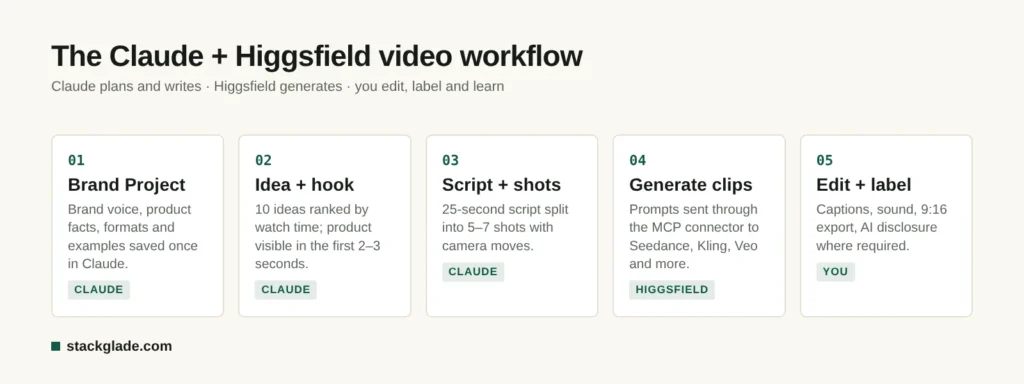
Claude plans and writes, Higgsfield generates the clips, and you edit, label and learn.
What Is Higgsfield AI?
Higgsfield is an AI video and image platform founded in 2023 by Alex Mashrabov, formerly head of generative AI at Snap, and Yerzat Dulat. Instead of offering a single model, it brings together its own tools and more than 30 third-party models in one interface. According to the company, it has passed 25 million users, and in August 2026 it raised a $400 million Series B at a $5.4 billion valuation, as reported by The Next Web.
The main reasons creators use Higgsfield:
Many video models in one place. Higgsfield’s own model comparison lists video models such as Seedance 2.5, Kling 3.0, Sora 2, Veo 3.1, WAN, and Grok Imagine, plus image models such as Nano Banana Pro, Flux, Seedream, GPT Image 2, and Ideogram. You can test the same idea on several models and keep the best result.
Cinematic camera control. Its Cinema Studio 4.0, released in August 2026, offers more than 30 camera movement presets, several camera and lens styles, and clips of up to 30 seconds at up to 1080p.
Consistent characters. Tools such as Soul ID keep the same face or character across multiple clips, which is essential for a recurring brand mascot or presenter.
Marketing tools. Higgsfield offers ad-focused tools such as Marketing Studio, Click-to-Ad, and Ads Studio, plus lip-sync dubbing into many languages.
Why Combine Higgsfield With Claude?
Higgsfield is excellent at generating footage, but a great video starts long before you press “generate”. Most AI videos fail because of a weak idea, a slow opening, or vague prompts. That is where Claude helps. Claude does not generate realistic video itself (its models take text and images as input and produce text, according to Anthropic’s documentation), but it is very good at the thinking work:
Researching your audience and turning a product benefit into a video idea.
Writing scroll-stopping hooks and tight scripts that fit a 15, 30, or 60-second format.
Breaking a script into shots and writing detailed, model-ready prompts for each one.
Keeping a consistent brand voice across dozens of videos with Projects.
Reviewing results and suggesting improvements.
With the Higgsfield connector, Claude can also send those prompts straight to Higgsfield, choose a model for each shot, and return the generated clips, so planning and production happen in one conversation.
How to Connect Higgsfield to Claude (Official MCP Connector)
Higgsfield provides an official MCP server, the open standard that lets AI assistants use outside tools. According to Higgsfield’s help center, setup takes about two minutes:
Get a paid Higgsfield plan. The connector requires a paid subscription, and every generation made through Claude uses your Higgsfield credits.
Open Claude’s connector settings. In Claude, go to Settings, then Connectors, and choose Add custom connector.
Paste the server address. Enter https://mcp.higgsfield.ai/mcp and save.
Sign in to Higgsfield. Approve the connection with your Higgsfield account.
Test it. In a new chat, ask Claude to check your Higgsfield credit balance or to generate a short test clip.
According to Higgsfield, once connected Claude can generate images and video with Higgsfield’s models, upscale and reframe clips, use motion control, create consistent characters, add voiceovers, clone voices, dub videos, and turn YouTube videos into short clips. Its Claude video generator page says clips can be produced in 16:9, 9:16, 1:1, and 4:5 formats.
Good to know: custom connectors are not verified by Anthropic and act with your account’s permissions, so connect only services you trust, and set tools that spend credits to “needs approval” in Claude’s connector settings if you want to confirm each generation. Our guide to Claude’s models and plans explains which plans include connectors.
The 7-Step Workflow for Successful AI Videos
Step 1: Set Up a Claude Project for Your Brand
Create a Project in Claude and add your brand guidelines, product information, target customer, tone of voice, and three or four examples of videos you like. Add standing instructions such as “All videos are vertical 9:16, under 30 seconds, with captions and a clear call to action.” Every video you plan inside the Project will follow these rules automatically.
Step 2: Find an Idea That Earns Attention
Ask Claude for ideas tied to a single customer problem. A useful prompt:
“Give me 10 short-form video ideas for [product] aimed at [customer]. Each idea must show a problem in the first second and the result by the end. Rank them by likely watch time and explain why.”
Pick one idea. Specific beats generic: “a cracked phone screen fixed in 20 minutes” outperforms “we repair phones”.
“Write a 25-second vertical video script. Show the product within 2 seconds. Use on-screen text for the hook, one benefit per shot, and end with a clear call to action. Format it as a table with time, visual, on-screen text, and voiceover.”
Step 4: Turn the Script Into Shot Prompts
AI video models work best with one clear action per clip. Ask Claude to convert each row of the script into a prompt that describes the subject, action, setting, lighting, camera movement, style, and duration. For example:
“Close-up of a ceramic coffee mug on a sunlit wooden counter, steam rising, slow dolly-in camera move, warm morning light, shallow depth of field, cinematic, 5 seconds, 9:16.”
Ask Claude to keep the same character and setting descriptions across shots so your clips match.
Step 5: Generate the Clips in Higgsfield
Either paste the prompts into Higgsfield or, with the connector, ask Claude to generate them for you. Practical tips:
Start from an image when consistency matters. Generate or upload a keyframe image first, then animate it, which gives you more control than text-to-video alone.
Use camera presets for movements such as dolly-ins, orbits, or crash zooms instead of describing them loosely.
Test two or three models on your most important shot. Different models are stronger at people, products, physics, or stylized looks.
Keep clips short. Generate 3 to 10-second shots and combine them, rather than one long clip.
Step 6: Edit, Add Sound, and Caption
Assemble the clips in a video editor such as CapCut, Canva, or Premiere, add music or voiceover, and add captions, since many people watch without sound. Higgsfield’s voiceover and lip-sync tools, or Claude-written voiceover scripts read by a voice tool, can fill the audio gap.
Step 7: Publish, Label, and Learn
Upload in the right format for each platform, label realistic AI content where required (see below), and track results. After a week, paste your views, average watch time, and comments into Claude and ask it what to change in the next video. This feedback loop is what turns occasional viral hits into a reliable content engine.
Copy-and-Paste Prompt Templates
Hook generator (Claude):
“My audience is [who]. Their biggest frustration is [problem]. Write 10 hooks under 8 words that create curiosity or show a surprising result. No clickbait that the video can’t deliver.”
Storyboard (Claude):
“Turn this script into a storyboard of 5 to 7 shots. For each shot give: duration, camera move, subject, action, setting, lighting, and a final Higgsfield-ready prompt.”
Product shot (Higgsfield):
“[Product] on a [surface], [lighting], slow orbit camera move, clean background, commercial product photography style, crisp detail, 5 seconds, vertical.”
Character scene (Higgsfield):
“[Consistent character description] walks into a busy [location], looks at camera and smiles, handheld camera, natural daylight, realistic, 6 seconds, 9:16.”
16:9 uploads count as regular videos (YouTube Help)
Instagram Reels
Vertical 9:16
Up to 3 minutes when recorded in the app (Instagram Help)
Use captions and an on-screen hook
TikTok
Vertical 9:16
Varies by upload method
TikTok reports vertical videos earned a 25% higher 6-second view rate in its ad research
How Much Does It Cost?
Tool
Plan
Price
What you get
Higgsfield
Starter
$15/month
200 credits, selected models
Higgsfield
Plus
$49/month
1,000 credits
Higgsfield
Ultra
$129/month
3,000 credits
Claude
Free
$0
Projects (up to 5) and connectors, with usage limits
Claude
Pro
$20/month ($17 billed annually)
More usage, Opus 5.5, unlimited Projects
Higgsfield prices are from its own October 2026 subscription guide and have changed several times this year, so check the live pricing page. Note that “unlimited” model windows on some Higgsfield plans apply only on the Higgsfield website; generations through Claude or other integrations always use credits. Claude prices are from Anthropic’s pricing page.
A realistic starter budget for a small business is Higgsfield Starter or Plus plus Claude Pro, about $35 to $70 per month, which can produce several short videos a week depending on the models and lengths you use.
Rules for Publishing AI Video
AI video is allowed on the major platforms, but realistic AI content must be disclosed:
YouTube requires creators to disclose realistic altered or synthetic content using the “AI use” setting in YouTube Studio. AI-assisted scripts and clearly unrealistic content do not need a label, and repeatedly failing to disclose can lead to penalties, according to YouTube Help.
TikTok requires realistic AI-generated content to be labeled and also detects AI content automatically using industry metadata, according to its newsroom.
Meta (Instagram and Facebook) adds “AI info” labels and asks users to disclose photorealistic AI video and realistic audio, as described in Meta’s announcement.
Beyond platform rules, Higgsfield’s help center says you own your outputs and can use them commercially, but you may not use them to train AI models, and free-plan videos may carry watermarks (Higgsfield Help Center). Never create videos of real people without permission, never imitate other brands or copyrighted characters, and never present AI footage as real customer testimonials. The US Federal Trade Commission warns businesses against deceptive uses of AI.
Common Mistakes to Avoid
Starting with the tool instead of the idea. Beautiful footage cannot save a boring concept.
Slow openings. If the product or result does not appear in the first two or three seconds, most viewers leave.
One long prompt for a whole video. Generate shot by shot and edit them together.
Inconsistent characters. Use keyframe images and consistent character tools for recurring people or mascots.
Ignoring sound and captions. Add music, voice, and on-screen text.
Spending credits on experiments. Test ideas on cheaper or faster models, then use premium models for the final shots.
Frequently Asked Questions
Can Claude make videos?
Claude cannot generate realistic video on its own; its models produce text. However, it can plan videos, write scripts and prompts, and, through Higgsfield’s official connector, send prompts to Higgsfield’s video models and return the generated clips in your chat.
How do I connect Higgsfield to Claude?
With a paid Higgsfield plan, open Claude’s Settings, go to Connectors, choose Add custom connector, paste https://mcp.higgsfield.ai/mcp, and sign in to Higgsfield. Generations made through Claude use your Higgsfield credits.
How much does Higgsfield cost?
As of October 2026, Higgsfield lists Starter at $15 per month with 200 credits, Plus at $49 with 1,000 credits, and Ultra at $129 with 3,000 credits. Prices have changed during 2026, so check the official pricing page before subscribing.
Can I use Higgsfield videos commercially?
According to Higgsfield’s help center, you own your outputs and can use them commercially, although free-plan outputs may include watermarks and outputs may not be used to train AI models. Legal indemnification for third-party claims is offered only on Enterprise plans.
Do I have to label AI videos on TikTok, Instagram, and YouTube?
Yes, for realistic AI-generated or altered content. YouTube, TikTok, and Meta all require disclosure of realistic synthetic media, and they may label content automatically. Clearly unrealistic or stylized content, and AI-assisted scripts, generally do not need a label.
The Bottom Line
The winning formula for AI video in 2026 is simple: let Claude handle strategy, hooks, scripts, and prompts, and let Higgsfield handle the footage. Connect them with Higgsfield’s official connector, work shot by shot, show the payoff in the first seconds, label realistic AI content, and use your results to improve every new video. For more ways to put AI to work in your business, read our guide to the best AI tools for small business and our ChatGPT vs Claude comparison.
Leave a Reply