AI image generators can now produce product mockups, social media graphics, blog illustrations, and ad concepts in seconds, at a fraction of the cost of stock photos or a designer for routine work. But the tools differ a lot in image quality, ease of use, price, and, most importantly for a business, how safe their images are to use commercially. This guide compares the best AI image generators for small businesses in 2026, explains what each is best at, covers pricing, and answers the legal questions you should understand before putting AI images on your website or in your marketing.
Tools and prices were checked against official sources in early October 2026. AI image tools update their models frequently, so check the latest details before subscribing. This guide is general information, not legal advice.
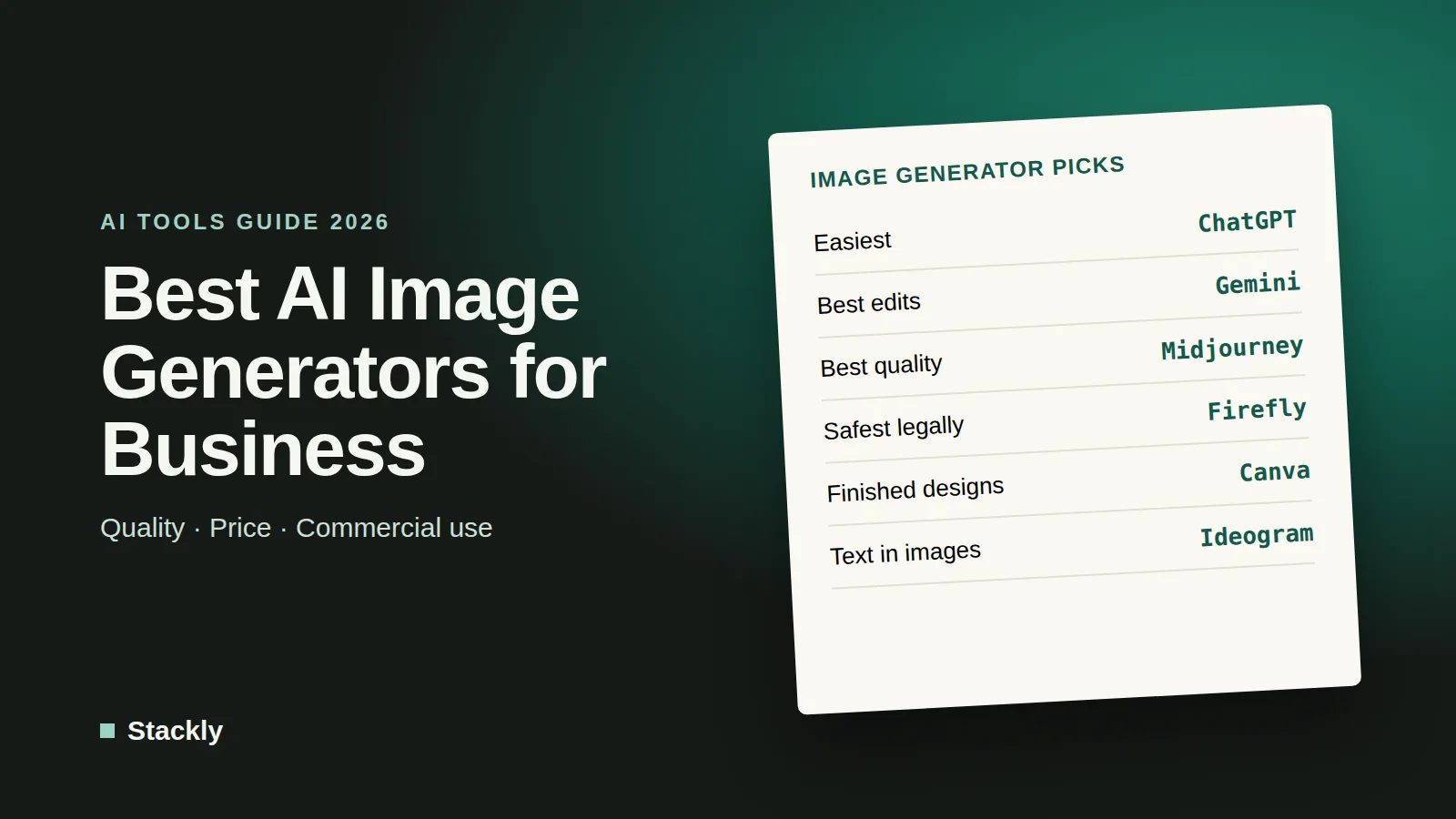
The Best AI Image Generators at a Glance
Tool
Best for
Free option
Paid plans from
ChatGPT (GPT Image)
Easy, conversational image creation and editing
Limited free use
Included with ChatGPT Plus, $20/month
Google Gemini (Nano Banana)
Fast editing and consistent product or character images
Limited free use
Included with Google’s paid AI plans
Midjourney
The most artistic, high-quality visuals
No
$10/month
Adobe Firefly
Commercially safe images for brand work
Free daily generations
About $10/month
Canva
Turning AI images into finished designs
Limited AI uses
$144/year (Canva Pro)
Ideogram
Images with accurate text, such as posters and logos
Limited free use
Paid plans available
ChatGPT: Best for Ease of Use
ChatGPT’s built-in image generation lets you describe what you want in plain language, then refine it through conversation, for example “make the background white”, “add our product on the table”, or “change the text to say Grand Opening”. It is especially good at following detailed instructions and at editing an image you upload. Image generation is available with limits on the free plan and with higher limits on paid plans, starting with ChatGPT Plus at $20 per month, according to the official ChatGPT pricing page.
Best for: Social media graphics, blog illustrations, quick mockups, and editing existing images without design skills. Our ChatGPT guide covers its other features.
Google Gemini (Nano Banana): Best for Editing and Consistency
Google’s image model, widely known by its nickname Nano Banana, is built into the Gemini app. It is particularly strong at editing photos while keeping people, products, and styles consistent across multiple images, which is useful for creating a series of product shots or campaign visuals. It is available with limits for free and with more usage on Google’s paid AI plans. If your business uses Google Workspace, Gemini features also appear inside Google’s apps; see our guide to the best AI tools for small business.
Best for: Product photo edits, consistent characters or mascots, and quick variations.
Midjourney: Best Image Quality
Midjourney remains a favorite of designers for striking, artistic, and photorealistic images. Plans start at $10 per month for the Basic plan, with Standard at $30 and Pro at $60, and annual billing saves 20%. Two details matter for businesses: images are visible to other users by default unless you use “Stealth Mode”, which is only available on the Pro and Mega plans, and companies with more than $1 million in annual revenue must subscribe to Pro or Mega to comply with Midjourney’s commercial terms.
Best for: High-impact hero images, mood boards, ad concepts, and brand imagery.
Adobe Firefly: Best for Commercial Safety
Adobe Firefly is designed with commercial use in mind. Adobe says its own Firefly models are trained on licensed and public domain content and that their outputs are safe for commercial use, and eligible enterprise customers can get IP indemnification for certain outputs. Firefly offers free daily generations, with paid plans starting at around $10 per month for a monthly allowance of generative credits. It also integrates with Photoshop, Illustrator, and Adobe Express.
Best for: Businesses that want to minimize legal risk, and teams already using Adobe apps.
Canva: Best for Finished Designs
Canva is not the most advanced image generator, but it is the easiest way to turn an AI image into a finished social post, flyer, presentation, or ad with your logo, fonts, and brand colors. The free plan includes a limited number of AI uses, and Canva Pro, at $144 per year, includes ten times more AI usage plus brand kits and social scheduling.
Best for: Small businesses that want AI images and design templates in one place.
Ideogram: Best for Text in Images
Many AI image generators struggle to spell words correctly inside images. Ideogram is known for handling text well, which makes it useful for posters, event flyers, social graphics with headlines, and early logo concepts. It offers limited free use and paid plans for more generations.
Best for: Graphics where readable text matters.
Can You Use AI-Generated Images for Your Business?
Generally, yes, but there are important rules and risks to understand.
Check each tool’s terms. Most paid AI image tools allow commercial use of the images you create, but conditions vary. Midjourney, for example, requires larger companies to use specific plans. Always read the current terms of service for the tool you use.
You may not own copyright in purely AI-generated images. In January 2025, the US Copyright Office published Part 2 of its report on copyright and AI, concluding that copyright protects human authorship and that prompts alone generally do not give the user enough control to make them the author of the output. Images that include significant human creative input, such as substantial editing or combining AI elements into an original design, may be protectable to the extent of that human contribution. In practice, this means competitors could potentially reuse a purely AI-generated image, so be cautious about using one as your logo or core brand asset.
Avoid copying protected work. Do not prompt tools to imitate specific brands, logos, copyrighted characters, or living artists’ distinctive styles, and do not create images of real people without permission. These uses can create legal and reputational problems regardless of which tool you use.
Be transparent where it matters. Do not use AI images in ways that mislead customers, such as presenting AI-generated product photos as real photos of a product that looks different, or creating fake customer photos or testimonials. Regulators such as the US Federal Trade Commission warn businesses against misleading uses of AI. In the EU, new AI Act transparency rules are phasing in requirements to label certain AI-generated content.
Practical Ways Small Businesses Use AI Images
Social media posts: Seasonal promotions, quote graphics, and eye-catching visuals for announcements.
Blog and website illustrations: Unique header images instead of overused stock photos.
Product mockups: Showing packaging ideas, merchandise designs, or products in different settings before a real photoshoot.
Ad testing: Creating several visual concepts quickly to see which performs best.
Presentations and proposals: Custom diagrams and illustrations that make documents look more professional.
Tips for Better AI Images
Be specific. Describe the subject, setting, lighting, style, colors, and composition. “A flat lay of handmade soap bars on a light wooden table, soft natural morning light, minimal style, lots of empty space on the right for text” works far better than “soap picture”.
Specify the format. Ask for the aspect ratio you need, such as square for Instagram or wide for a website banner.
Iterate. Generate several versions, pick the best, and refine it with follow-up instructions.
Add your brand in a design tool. Place your logo, fonts, and text in Canva or similar tools rather than relying on the generator.
Optimize before uploading. Compress images and save them as WebP to keep your website fast; our WordPress speed guide explains how.
It depends on the job. ChatGPT is the easiest all-rounder, Midjourney produces the highest-quality artistic images, Adobe Firefly is the safest choice for commercial brand work, and Canva is best for turning images into finished designs.
Can I use AI-generated images for my business?
Usually yes, if the tool’s terms allow commercial use, which most paid plans do. However, purely AI-generated images may not be protected by copyright, and you should avoid imitating brands, copyrighted characters, or real people.
Are AI-generated images copyrighted?
According to the US Copyright Office, purely AI-generated material is not protected by copyright, because copyright requires human authorship. Works that include substantial human creative input may be protected to the extent of that human contribution.
Which AI image generator is free?
ChatGPT, Google Gemini, Adobe Firefly, Canva, and Ideogram all offer some free image generation with limits. Midjourney requires a paid subscription.
Should I use AI to create my logo?
AI tools are useful for exploring logo ideas, but be careful about using a purely AI-generated logo as your final brand mark, because it may not be protected by copyright or trademark-ready. Many businesses use AI for inspiration and then have a designer create the final version.
The Bottom Line
AI image generators can give a small business a steady supply of custom visuals for very little money. Start with the tool you already have access to, such as ChatGPT, Gemini, or Canva, try Midjourney when quality matters most, and choose Adobe Firefly for brand assets where legal safety is a priority. Read each tool’s terms, avoid imitating protected work, and keep a human designer involved for your most important brand assets.
Leave a Reply