Email is still one of the most reliable ways for a small business to reach customers. You own your list, you do not depend on a social media algorithm, and a single well-timed message can bring in sales the same day. The hard part is choosing the right software. Dozens of email marketing platforms compete for small businesses, their pricing models work in very different ways, and a tool that looks cheap at 500 subscribers can become expensive as your list grows. This guide compares the leading email marketing tools for small businesses in 2026, explains how their pricing really works, and gives you a practical setup plan so your emails actually reach the inbox.
Prices in this guide are starting prices in US dollars, checked on each provider’s official pricing page in September 2026. Email platforms change their plans often, so confirm current pricing before you buy.
The Best Email Marketing Tools for Small Businesses at a Glance
Tool
Best for
Free plan
Paid plans from
Priced by
MailerLite
Most small businesses and freelancers
250 subscribers, 2,500 emails/month
$12/month
Subscribers
Brevo
Large lists that you email occasionally
300 emails/day
$9/month
Emails sent
Mailchimp
Businesses that need many integrations
250 contacts, 500 emails/month
$13/month
Contacts
Kit
Creators, coaches, and newsletter writers
Up to 10,000 subscribers
$33/month
Subscribers
Klaviyo
Online stores
250 profiles, 500 emails/month
$20/month
Active profiles
MailerLite: Best Overall for Small Businesses
MailerLite offers the best balance of price, features, and ease of use for most small businesses. Its drag-and-drop editor is simple to learn, and even entry-level plans include automations, signup forms, landing pages, and a basic website builder.
Pricing: The free plan covers up to 250 subscribers and 2,500 emails per month, with a limited number of automations. The Comfort plan (previously called Growing Business) starts at $12 per month for 500 subscribers and adds more automations, an AI writing assistant, and smart sending. The Power plan starts at $25 per month with unlimited emails and automations. MailerLite only counts active subscribers, so unsubscribed and bounced contacts do not increase your bill.
Choose it if you want a capable, affordable tool that you can set up in an afternoon.
Brevo: Best for Large Lists and Occasional Sending
Brevo, formerly Sendinblue, prices by the number of emails you send rather than the number of contacts you store. That makes it unusually cheap for businesses with a big contact list that only email once or twice a month.
Pricing: The free plan allows up to 300 emails per day. The Starter plan begins at around $9 per month for 5,000 emails, although removing Brevo’s branding costs extra on that plan, and the Standard plan starts at around $18 per month with branding removed, A/B testing, and landing pages, according to EmailToolTester’s pricing analysis. Brevo also includes transactional email, SMS, and a simple CRM.
Choose it if you have thousands of contacts but send infrequently, such as a local business with a monthly newsletter.
Mailchimp: Best for Integrations
Mailchimp is the best-known name in email marketing and connects with a huge range of apps, online stores, and website builders. However, it has become less generous over the years, and it is now rarely the cheapest option.
Pricing: The free plan supports up to 250 contacts and 500 emails per month. Essentials starts at $13 per month, Standard at $20 per month with more advanced automation, and Premium at $350 per month. Mailchimp counts contacts in your audience, including unsubscribed ones if you do not archive them, so regular list cleaning keeps costs down.
Choose it if you rely on a specific integration that only Mailchimp supports well.
Kit: Best for Creators and Newsletters
Kit, formerly ConvertKit, is built for people who sell their expertise: coaches, consultants, authors, podcasters, and course creators. It focuses on growing and monetizing an audience rather than on designing complex promotional emails.
Pricing: Kit’s free Newsletter plan supports up to 10,000 subscribers with unlimited broadcasts and landing pages, which is exceptionally generous. The Creator plan, at $33 per month, adds visual automations and email sequences, and the Pro plan costs $66 per month.
Choose it if your business is built around a newsletter, digital products, or a personal brand.
Klaviyo: Best for Online Stores
Klaviyo is the leading email platform for e-commerce. It connects deeply with Shopify, WooCommerce, and other store platforms, and uses purchase data to send targeted messages such as abandoned cart reminders and product recommendations.
Pricing: The free plan includes up to 250 active profiles and 500 emails per month. The Email plan starts at $20 per month, and a combined Email and SMS plan starts at $35 per month, according to EmailToolTester. Klaviyo charges based on active profiles, so costs rise quickly as your store grows.
Choose it if you run an online store and want automations driven by what customers buy.
How Email Pricing Really Works
The biggest mistake small businesses make is comparing only the starting price. Email platforms use three main billing models, and the right one depends on how you send.
Per subscriber or contact (MailerLite, Mailchimp, Kit): You pay according to the size of your list, usually with generous or unlimited sending. Best if you email a moderately sized list often.
Per email sent (Brevo): You pay for sending volume, and contacts are cheap or unlimited. Best if you have a large list and email rarely.
Per active profile (Klaviyo): Similar to per-contact pricing, but tied to e-commerce data. Powerful for stores, but it gets expensive as your customer base grows.
A simple example: A yoga studio with 3,000 contacts that sends one newsletter a month sends about 3,000 emails. On a send-based plan, that fits within an entry-level tier. On a contact-based plan, the studio pays for all 3,000 contacts every month, even though it rarely emails them. A coaching business with 800 subscribers that emails three times a week is the opposite case: a subscriber-based plan is usually cheaper because sending volume is high but the list is small.
Before choosing, estimate two numbers: how many contacts you will have in a year and how many emails you will send each month. Then check each provider’s pricing calculator with those figures.
Deliverability: Making Sure Your Emails Reach the Inbox
Great emails are useless if they land in spam. Since 2024, major mailbox providers have tightened their rules. Google now requires bulk senders to authenticate their email, offer one-click unsubscribe, and stay under a clear spam complaint threshold, and Yahoo and Microsoft have introduced similar requirements. Even if you send fewer messages, following these rules protects your reputation.
Set up these basics before your first campaign:
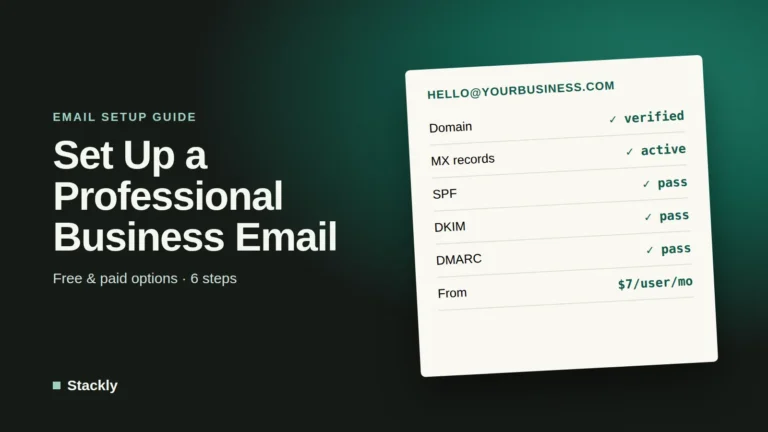
Use a domain email address. Send from an address such as hello@yourbusiness.com, not a free Gmail or Outlook address. Our domain name guide explains how to get one.
Authenticate your domain. Add the SPF, DKIM, and DMARC records your email platform provides to your domain’s DNS settings. Most platforms walk you through this step by step.
Only email people who opted in. Never buy lists. Purchased contacts generate spam complaints and can get your account suspended.
Make unsubscribing easy. Every marketing email must include a clear unsubscribe link, and requests should be processed promptly.
Clean your list regularly. Remove contacts who have not opened or clicked in six to twelve months. A smaller, engaged list delivers better results and often costs less.
Three Automations Every Small Business Should Set Up
Automations send the right message at the right time without any manual work. Start with these three:
1. Welcome sequence. Two to four emails over the first week that introduce your business, share your most useful content or best products, and include a clear next step. Welcome emails are typically among the most engaging messages you will ever send.
2. Follow-up after purchase or inquiry. A thank-you message, helpful tips on using what the customer bought, and a request for a review a week or two later.
3. Re-engagement. An automatic email to subscribers who have not engaged for several months, asking if they still want to hear from you, followed by removing those who do not respond.
Online stores should add an abandoned cart reminder as a fourth automation. If you want to connect email to other tools, such as your CRM or accounting software, our guide to AI productivity apps and automation explains how.
Which Metrics to Track
Open rates have become unreliable, because privacy features in some email apps, such as Apple Mail Privacy Protection, load emails automatically and can make open rates look higher than they really are. Focus on metrics that reflect real actions:
Click rate: The share of recipients who click a link. This is the clearest sign that your content is relevant.
Conversions and revenue: Sales, bookings, or inquiries that come from each campaign or automation.
Unsubscribe and spam complaint rates: Rising numbers mean you are emailing too often or sending content people did not expect.
List growth: How many new subscribers you add each month, and from which signup forms.
Staying Legal
Email marketing is regulated in most countries. In the United States, the CAN-SPAM Act requires accurate sender information, honest subject lines, a physical postal address, and a working way to opt out. In the European Union and the United Kingdom, GDPR and related rules generally require clear consent before you send marketing emails. Use your platform’s double opt-in and consent features, and keep records of how each subscriber joined your list.
How to Choose: A Quick Decision Guide
Your situation
Best starting choice
Small business or freelancer, first email tool
MailerLite
Large contact list, one or two emails a month
Brevo
Online store on Shopify or WooCommerce
Klaviyo
Coach, creator, or paid newsletter
Kit
Need a specific integration only Mailchimp offers
Mailchimp
Very tight budget with a growing list
Kit (free) or Brevo (free)
If you are still building your wider set of business tools, our guides to small business CRM software and accounting software cover how these tools work together. AI writing assistants can also speed up drafting newsletters; see our comparison of the best AI writing tools.
Frequently Asked Questions
What is the best email marketing software for a small business?
For most small businesses, MailerLite offers the best mix of affordability, features, and ease of use. Online stores are usually better served by Klaviyo, creators by Kit, and businesses with large lists that email infrequently by Brevo.
What is the cheapest email marketing tool?
It depends on how you send. Kit’s free plan supports up to 10,000 subscribers, and Brevo’s free plan allows 300 emails a day with a large contact allowance. For paid plans, MailerLite and Brevo generally offer the lowest starting prices.
Is Mailchimp still worth it in 2026?
Mailchimp remains a solid platform with excellent integrations, but its free plan is limited and its paid plans are often more expensive than alternatives with similar features. It is worth it mainly if you need a specific integration or already know it well.
How often should a small business send marketing emails?
Most small businesses do well with one to four emails per month, plus automated messages such as welcome sequences. Consistency matters more than frequency, and watching unsubscribe rates tells you whether you are sending too often.
Do I need a domain email address for email marketing?
Yes. Sending from your own domain, with SPF, DKIM, and DMARC set up, is essential for good deliverability. Free email addresses from Gmail or Outlook are not suitable for marketing campaigns and are likely to be filtered as spam.
The Bottom Line
The best email marketing software is the one that fits how you actually send. Start with MailerLite if you are unsure, choose Klaviyo for an online store, Kit for a creator business, and Brevo for a large list you email occasionally. Whatever you choose, authenticate your domain, grow your list with genuine opt-ins, set up a welcome sequence, and measure clicks and conversions rather than opens. Those basics will do more for your results than any individual feature.


Leave a Reply