On October 21, 2026, the PHP project released emergency security updates for two critical vulnerabilities that security researchers have nicknamed PHP2Shell. Tracked as CVE-2026-109618 and CVE-2026-109619, both flaws can allow an attacker to run code on a web server without logging in, and security firms reported attacks in the wild within hours of the details leaking. Because PHP powers WordPress, WooCommerce, Drupal, Joomla, and a huge share of the web, millions of business websites are potentially affected, regardless of how carefully their owners keep plugins and themes up to date. This guide explains, in plain language, what PHP2Shell is, who is at risk, how to check whether your website is protected, how to update, which temporary mitigations exist, and what to do if you suspect your site has already been compromised.
This article reflects official PHP advisories and security-industry reporting available on October 21–22, 2026. The situation is developing quickly, so check the official PHP announcements and your hosting provider’s status page for the latest information. This guide is general information, not professional incident-response advice.
Update, October 26: Working Exploits, a Third Flaw, and Host Status
The situation has escalated since the patches were released. Here is what changed between October 22 and October 26, 2026:
Attacks began before disclosure. Amazon says its honeypot network saw an exploit attempt on October 17, four days before the patches, and advises checking logs back to at least that date (The Register).
Exploitation has moved from probing to working shells. A researcher’s honeypots recorded 35 successful shells on October 24, according to SecurityWeek, and BleepingComputer confirmed successful exploitation in the wild. The Hacker News reported an intrusion at a European government entity investigated by Palo Alto Networks Unit 42.
A third flaw, CVE-2026-115560. On October 23, php.net published an informational advisory about a less likely remote code execution risk in session upload progress handling, which only applies under specific configurations. It is not yet fixed in a release; the mitigation is the same setting already recommended above: session.upload_progress.enabled=0.
CISA has not yet added PHP2Shell to its Known Exploited Vulnerabilities catalog as of the morning of October 26, although it urged immediate patching.
Hosts have largely patched shared hosting.Hostinger completed its rollout on October 22 for all plans except VPS; CloudLinux shipped fixed packages for PHP 5.2 to 8.5; and an independent host tracker lists WP Engine, Kinsta, SiteGround, Cloudways, and DreamHost as patched. VPS and dedicated servers are usually your responsibility.
Downtime and SEO. Google’s John Mueller advised that sites taken offline for emergency updates should return an HTTP 503 status rather than errors or timeouts (Search Engine Roundtable).
Bottom line: if you have not confirmed that your server is patched, do it today, and review logs from October 17 onward for signs of compromise.
PHP2Shell at a Glance
CVE-2026-109618
CVE-2026-109619
Official description
Remote code execution via out-of-memory corruption
Remote code execution via stale global state
Severity
Critical, CVSS v4.0 score 9.2
Critical, CVSS v4.0 score 9.2
Login required?
No
No
Main impact
Attacker can run code as the web server user
Same, plus possible leaks of server memory such as passwords or API keys
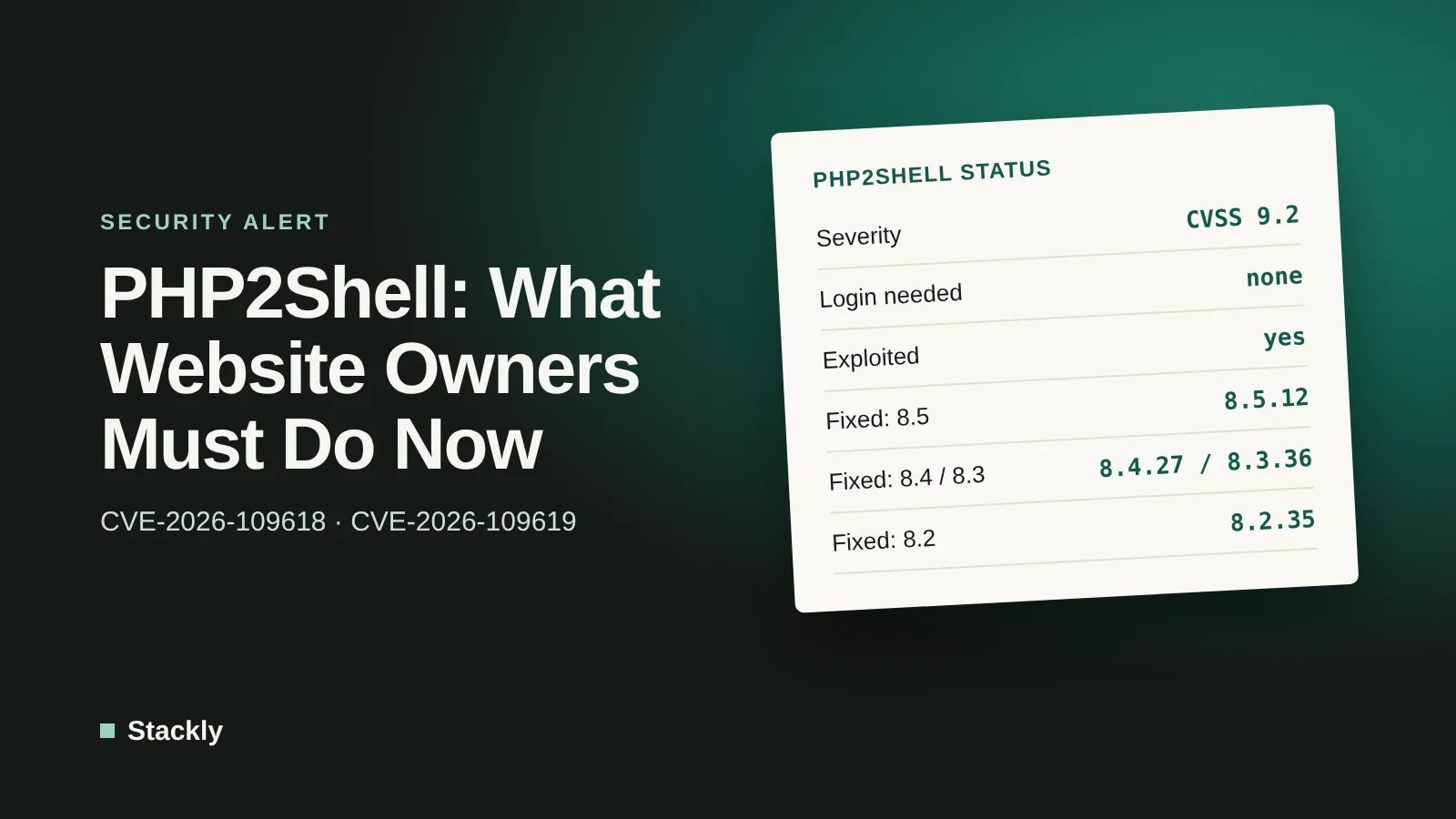
The short version: if your website runs on PHP and your server has not yet been updated to PHP 8.5.12, 8.4.27, 8.3.36, or 8.2.35 or a vendor-patched equivalent, treat it as vulnerable and update now. Updating WordPress, themes, or plugins does not fix this problem, because the flaws are in PHP itself.
What Happened: The PHP2Shell Timeline
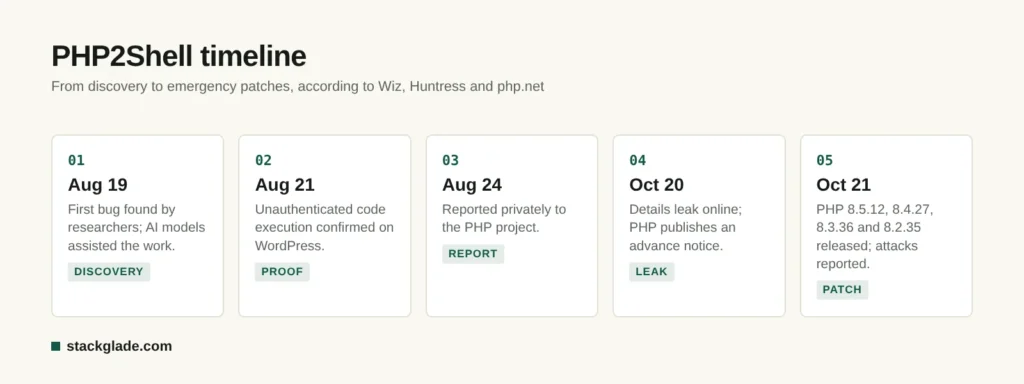
PHP2Shell timeline, based on Wiz, Huntress and php.net.
According to cloud security firm Wiz, whose researchers were among those credited with the discovery, the story unfolded over two months:
August 19, 2026: the first bug is found. Wiz says AI models helped its researchers find and exploit the flaws.
August 21: unauthenticated remote code execution is confirmed against a WordPress installation.
August 24: the issues are reported privately to the PHP project.
September 21: PHP acknowledges the reports and begins preparing fixes, sharing patches in advance with Linux distributions and long-term-support vendors.
October 20: technical details leak publicly through an online post that was later removed, according to Huntress. The PHP project publishes an advance security notice the same day and brings the release forward.
October 21: PHP releases patched versions and publishes full advisories. Security firms report exploitation attempts beginning before the patches were out.
The GitHub advisories credit reporters from several organizations, and BleepingComputer reports that the researchers came from Calif, Wiz, and OpenAI.
What Are the PHP2Shell Vulnerabilities? A Plain-Language Explanation
Every time someone visits a PHP-powered page, the web server hands the request to PHP, which reads the incoming data, runs the website’s code, and sends back a page. PHP2Shell abuses mistakes in how PHP manages memory while it sets up and cleans up those requests, before your website’s own code even runs.
CVE-2026-109618: Memory Corruption When PHP Runs Out of Memory
If PHP runs out of memory while it is still preparing a request, some of the request’s data can be left half-built. The cleanup process then treats that broken data as valid. A skilled attacker can craft a request that triggers this situation and use the resulting memory corruption to run their own code on the server.
CVE-2026-109619: Leftover Data From a Previous Request
Web servers reuse PHP worker processes for many requests in a row. This flaw allows data from a request that has already finished to linger in a worker, where the next request can read or free that leftover memory before it is properly reset. According to Wiz, this can lead both to code execution and to leaks of sensitive data held in server memory, such as passwords, tokens, and API keys. The advisory confirms exploitation paths involving PHP’s session upload-progress feature, and on PHP 8.5, the fatal error backtraces feature.
Why These Flaws Are So Serious
No login is needed. An attacker only needs to send specially crafted web requests.
Your application does not matter. The attack happens in PHP’s request handling, so a perfectly maintained WordPress site is just as exposed as a neglected one.
The attacker gets your web server’s powers. Code runs as the user account the web server uses, which typically has access to your website files, configuration files containing database passwords, and often the database itself.
Exposure is enormous. BleepingComputer, citing VirusTotal estimates, reports more than 5.1 million PHP hosts reachable on the internet.
Who Is Affected?
Affected PHP Versions
The official advisories list all versions below 8.2.35, 8.3.36, 8.4.27, and 8.5.12 in the supported branches as affected. Researchers say the underlying issues reach back much further: Wiz reports versions as old as PHP 5.4 are affected, and watchTowr refers to PHP 5, 7, and 8. PHP 8.1 and older are end-of-life and receive no official releases, although minimal source-code backports were published for 7.4, 8.0, and 8.1, and some Linux distributions and commercial vendors provide patched packages for older versions.
Affected Server Setups
According to php.net, all PHP installations that serve web requests are at risk, including the most common setups:
Apache with mod_php: the highest risk; the demonstrated exploit works with a single unauthenticated request.
PHP-FPM (used with Nginx and many modern hosts): exploitation of CVE-2026-109619 is confirmed through the upload-progress path; the CVE-2026-109618 advisory says no complete exploit had been shown on FPM at publication.
php-cgi, FrankenPHP, and LiteSpeed (LSAPI): listed as at risk, with FrankenPHP and LSAPI described as likely susceptible.
This is not limited to Windows or to unusual configurations. If your site runs on PHP, assume it is affected until confirmed patched.
Is My WordPress Site Affected?
Almost certainly, unless your host has already updated PHP. Wiz demonstrated unauthenticated remote code execution on the latest versions of WordPress, Drupal, and Joomla. As Patchstack and hosting providers have noted, WordPress security plugins cannot block the attack, because they run only after PHP has already processed the malicious request. The only real fix is a patched PHP version.
Is PHP2Shell Being Exploited?
Yes, according to several security firms, although reports differ on the scale:
Cloudflare’s CTO told BleepingComputer the company saw early attack attempts before patches shipped, and Cloudflare deployed temporary firewall rules for its customers.
Sansec reported the first attacks at 07:43 UTC on October 21, and said exploit tooling and write-ups are public.
watchTowr said its honeypots observed exploitation, and Patchstack reported confirmed incidents.
Huntress said it had not yet seen exploitation as of mid-morning US Eastern time on October 21.
Public proof-of-concept code is circulating widely; one security firm counted more than 100 repositories on GitHub and warned that some may themselves contain malware. Government agencies have responded quickly: the UK’s National Cyber Security Centre told organizations to update or take systems offline, and CERT-EU issued an advisory. Assume attackers are actively scanning for unpatched sites.
How to Check Your PHP Version
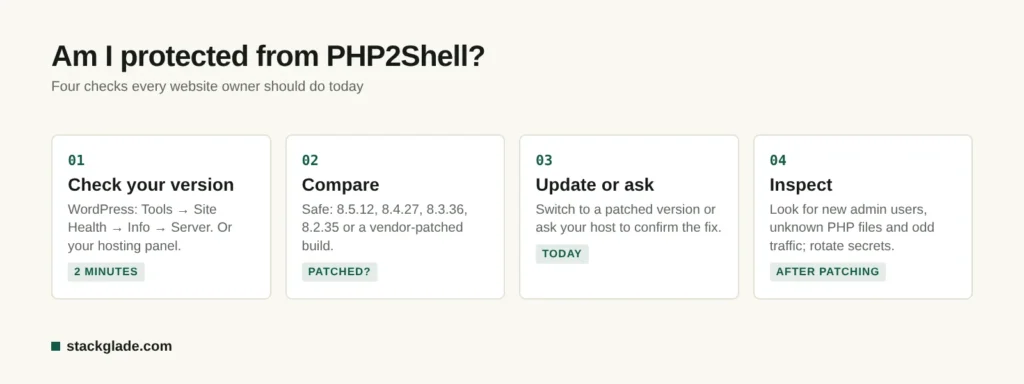
Four checks to confirm your site is protected.
In WordPress
Go to Tools, then Site Health, then Info, and open the Server section. Look for “PHP version”. You need 8.2.35, 8.3.36, 8.4.27, or 8.5.12 or higher in your branch. Note that some hosts apply security patches to older version numbers through their own packages (for example, CloudLinux or distribution packages), so if your number looks old, ask your host whether their build includes the PHP2Shell fixes.
In Your Hosting Control Panel
cPanel: open MultiPHP Manager or “Select PHP Version” to see the version used by each domain.
Plesk: open your domain’s PHP Settings.
Managed WordPress hosts: check the site’s dashboard or your host’s status page and announcements.
On a VPS or Dedicated Server
Connect via SSH and run php -v for the command-line version, and check the PHP-FPM or Apache module version your web server actually uses (for example with a temporary phpinfo() page that you delete immediately afterwards). Remember that a server can have several PHP versions installed.
How to Fix PHP2Shell: Update PHP
If You Use Shared or Managed Hosting
Your host controls PHP, so:
Check your host’s status page or email announcements for PHP2Shell updates.
Contact support and ask directly: “Have you deployed the PHP2Shell patches (CVE-2026-109618 and CVE-2026-109619) on my server?”
Switch to a supported, patched PHP version in your control panel if your host offers several versions. WordPress recommends PHP 8.3 or greater.
Take a fresh backup before and after changing PHP versions, and test your site.
Hosting responses vary. GoDaddy described the issue as industry-wide and recommended PHP 8.2 or newer; according to security firm Precursor, cPanel planned updated PHP packages for its supported versions, and CloudLinux was among the vendors that received patches in advance. If your host is slow to respond or cannot tell you whether you are patched, that is a serious warning sign; our guide to choosing web hosting for a small business explains what to look for in a provider.
If You Manage Your Own Server (VPS, Cloud, or Dedicated)
Update PHP packages from your distribution or trusted repository, for example with your system’s package manager, then confirm the new version.
Restart all PHP processes: restart PHP-FPM pools and Apache so no old workers keep running vulnerable code.
Update container images if you run PHP in Docker, then redeploy.
Check every server, including staging and old forgotten sites. Attackers scan the whole internet, not just your main website.
If you are on PHP 8.1 or older, plan an urgent upgrade to a supported branch. Until then, use a vendor that provides patched builds for your version, and apply the mitigations below.
Our comparison of VPS vs shared hosting explains the extra security responsibility that comes with managing your own server.
Temporary Mitigations If You Cannot Update Immediately
The PHP project is clear: “There are no complete mitigations; updating is the only safe choice.” PHP core developer Gina Peter Banyard told BleepingComputer that only the patches provide a permanent fix. However, php.net lists partial measures that reduce risk while you arrange an update:
For CVE-2026-109619 (stale state):
Disable upload progress tracking by setting session.upload_progress.enabled=0 in php.ini or the PHP-FPM pool configuration (not via ini_set or .user.ini), then restart all PHP workers.
On PHP 8.5, set fatal_error_backtraces=0.
For CVE-2026-109618 (out-of-memory corruption):
Limit request sizes: set post_max_size to 8M (32M if you need uploads) and keep upload_max_filesize below it.
Enforce request size, field count, and header limits at the web server or proxy level.
Use container or cgroup memory limits at the system level.
Other layers:
Web application firewall: Cloudflare deployed emergency rules on Managed and Free plans, and other providers have released rules too. These help but are explicitly temporary.
Restrict methods on sensitive endpoints: Sansec suggested blocking multipart/form-data or allowing only GET and HEAD requests where possible, which will break uploads and forms.
Be careful: some suggested settings have side effects. For example, php.net lists setting memory_limit=-1 via a non-overridable admin value as a mitigation for CVE-2026-109618, but Sansec warns this lets a single request consume all server memory. Test changes on a staging site first and remove temporary workarounds after patching.
How to Tell If Your Site Has Already Been Compromised
Because attacks may have started before patches were available, update first and then check for signs of intrusion:
Unexpected files: new PHP files in upload folders, unfamiliar files in your web root, or recently modified core files.
New administrator accounts in WordPress or your hosting panel that you did not create.
Strange processes: Huntress recommends watching for PHP worker processes that launch shells, curl, or wget.
Unusual outbound traffic or spam sent from your server, or sudden resource spikes.
Website changes: redirects to unknown sites, injected links or scripts, or security warnings in browsers or Google Search Console.
Log entries: large or malformed multipart requests in your web server logs around October 20–21 and afterwards.
If You Find Signs of Compromise
Isolate the site (maintenance mode or take it offline) to stop further damage.
Patch PHP if you have not already done so, otherwise attackers can simply return.
Rotate every secret: database passwords, WordPress salts and keys, hosting and SFTP passwords, and API keys stored in configuration files, because CVE-2026-109619 can leak data from memory.
Restore from a clean backup taken before the compromise, or have a professional clean the site.
Review user accounts and scheduled tasks for backdoors.
Inform affected parties if customer data may have been exposed, following the data protection laws that apply to you.
Request a review in Google Search Console if your site was flagged for malware.
If you run an online store on WooCommerce, Magento (Adobe Commerce), PrestaShop, or another PHP-based platform, the stakes are higher. A compromised store can expose customer names, addresses, and order histories, and attackers frequently inject card-skimming scripts into checkout pages to steal payment details as customers type them. E-commerce security firm Sansec, which specializes in this type of attack, was among the first to report PHP2Shell exploitation.
Online store owners should take a few extra steps:
Patch first, then inspect checkout pages. Look for unfamiliar JavaScript in your checkout templates, theme files, and settings fields where scripts can be added.
Check your payment setup. Hosted payment pages and payment fields provided directly by your payment processor reduce the damage a compromised server can do, because card details never pass through your server.
Review admin accounts and API keys for your store, payment gateway, and shipping integrations, and rotate them if you see any sign of compromise.
Watch for customer complaints about fraudulent charges shortly after purchases, a classic sign of a skimming infection.
Know your obligations. If you process card payments, your payment provider and card industry rules may require you to report a suspected breach.
Questions to Ask Your Hosting Provider
Many small business owners rely entirely on their host for server security. If your provider has not published a clear statement, send them these questions:
Have you deployed PHP versions that fix CVE-2026-109618 and CVE-2026-109619 on the server hosting my site?
Which PHP version is my site using right now, and is it a supported branch?
Have PHP processes been restarted since the update, so no vulnerable workers are still running?
Do you run a web application firewall, and has it been updated with rules for PHP2Shell?
Have you seen any signs of exploitation on your servers, and will you notify me if my account is affected?
When was my last backup taken, and how quickly can it be restored if needed?
A good host should answer quickly and clearly. If yours cannot, it may be time to compare providers; our cloud hosting guide and hosting comparison can help you evaluate alternatives.
How PHP2Shell Compares to Previous PHP Vulnerabilities
Critical PHP vulnerabilities are not new. In June 2024, for example, a flaw known as CVE-2024-4577 affected PHP running in CGI mode on Windows servers and was quickly exploited, including by ransomware groups. What makes PHP2Shell different is its reach: rather than depending on an unusual configuration, it affects the mainstream ways PHP serves web pages, including Apache mod_php and PHP-FPM on Linux, which together power most shared and managed hosting. Combined with a public leak before patches were ready and widely available exploit code, that is why security firms and government agencies treated it as an emergency.
Which PHP Versions Are Still Supported?
PHP2Shell is a reminder that running an outdated PHP version leaves you without security fixes. According to php.net’s supported versions page:
PHP branch
Status
Security fixes until
8.5
Active support
December 31, 2029
8.4
Active support
December 31, 2028
8.3
Security fixes only
December 31, 2027
8.2
Security fixes only
December 31, 2026
8.1 and older
End of life
No longer supported
If your site runs on PHP 8.2, the PHP2Shell patch is one of its final updates: plan your move to 8.3 or newer before the end of 2026. Upgrading PHP can also make your site noticeably faster, as explained in our guide to speeding up WordPress.
Lessons for Small Business Website Owners
PHP2Shell is not the last critical vulnerability you will face. A few habits make the next one far less stressful:
Choose a host with a strong security track record that patches quickly, communicates clearly, and lets you pick supported PHP versions.
Know your stack. Keep a simple list of your websites, where they are hosted, and which PHP version each uses.
Keep automatic, off-site backups and test restoring them.
Use a web application firewall or CDN that can deploy emergency rules quickly.
Subscribe to security announcements from your host and, if you run your own servers, from php.net and your Linux distribution.
Remove old, unused sites. Forgotten installations on the same server are a common way in.
Consider a managed platform if you do not have time for server maintenance; our comparison of website builders vs WordPress explains the trade-offs.
Interestingly, Wiz says AI models helped its team discover and exploit these flaws. As AI makes it faster both to find vulnerabilities and to weaponize them, the time between disclosure and attack is shrinking, which makes fast patching more important than ever. Our overview of the state of AI in 2026 covers this wider trend.
Frequently Asked Questions
What is PHP2Shell?
PHP2Shell is the nickname for two critical PHP vulnerabilities, CVE-2026-109618 and CVE-2026-109619, patched on October 21, 2026. Both can allow an unauthenticated attacker to run code on a web server running PHP, and one can also leak sensitive data from server memory.
Which PHP versions fix PHP2Shell?
The official fixes are in PHP 8.5.12, 8.4.27, 8.3.36, and 8.2.35. Older end-of-life versions do not receive official releases, although some Linux distributions and vendors provide patched builds.
Does updating WordPress protect me from PHP2Shell?
No. The vulnerabilities are in PHP itself, not in WordPress, themes, or plugins, and security plugins cannot block them. Your hosting provider or server administrator must update PHP.
Is PHP2Shell being actively exploited?
Several security firms, including Cloudflare, Sansec, watchTowr, and Patchstack, reported exploitation attempts beginning on October 21, 2026, and exploit code is publicly available. Treat unpatched servers as at immediate risk.
Are there workarounds for PHP2Shell?
Only partial ones. Disabling session upload progress, limiting request sizes, and using web application firewall rules can reduce risk, but the PHP project says there are no complete mitigations and updating is the only safe choice.
How do I know if my host has patched PHP2Shell?
Check your PHP version in WordPress under Tools, Site Health, Info, then Server, or in your hosting control panel, and check your host’s announcements. If in doubt, ask support whether your server includes the fixes for CVE-2026-109618 and CVE-2026-109619.
The Bottom Line
PHP2Shell is one of the most serious PHP security events in years: two critical, unauthenticated remote code execution flaws, public exploit code, and attacks starting within hours. The fix is straightforward but urgent: make sure every website and server you own runs PHP 8.5.12, 8.4.27, 8.3.36, 8.2.35, or a vendor-patched build, restart PHP processes, rotate secrets if you suspect compromise, and keep backups ready. If your host cannot confirm it has patched, push for an answer today or consider moving to a provider that takes security seriously.
Leave a Reply