WordPress 7.2 is the last major WordPress release of 2026, and the first beta arrived on October 20. It brings Notes that sit in the margin beside your content, a new Secrets API for safely storing API keys, text shadows, an “On This Day” dashboard widget, faster admin screens, and a long list of design and editor improvements. This guide covers the WordPress 7.2 release date and schedule, every major new feature, what it means for site owners, how to test the beta safely, and how to prepare your site for the update.
This guide is based on official WordPress.org announcements and testing documentation as of October 26, 2026. Features in beta can still change or be removed before the final release; we will update this page as the release approaches.
WordPress 7.2 Release Date and Schedule
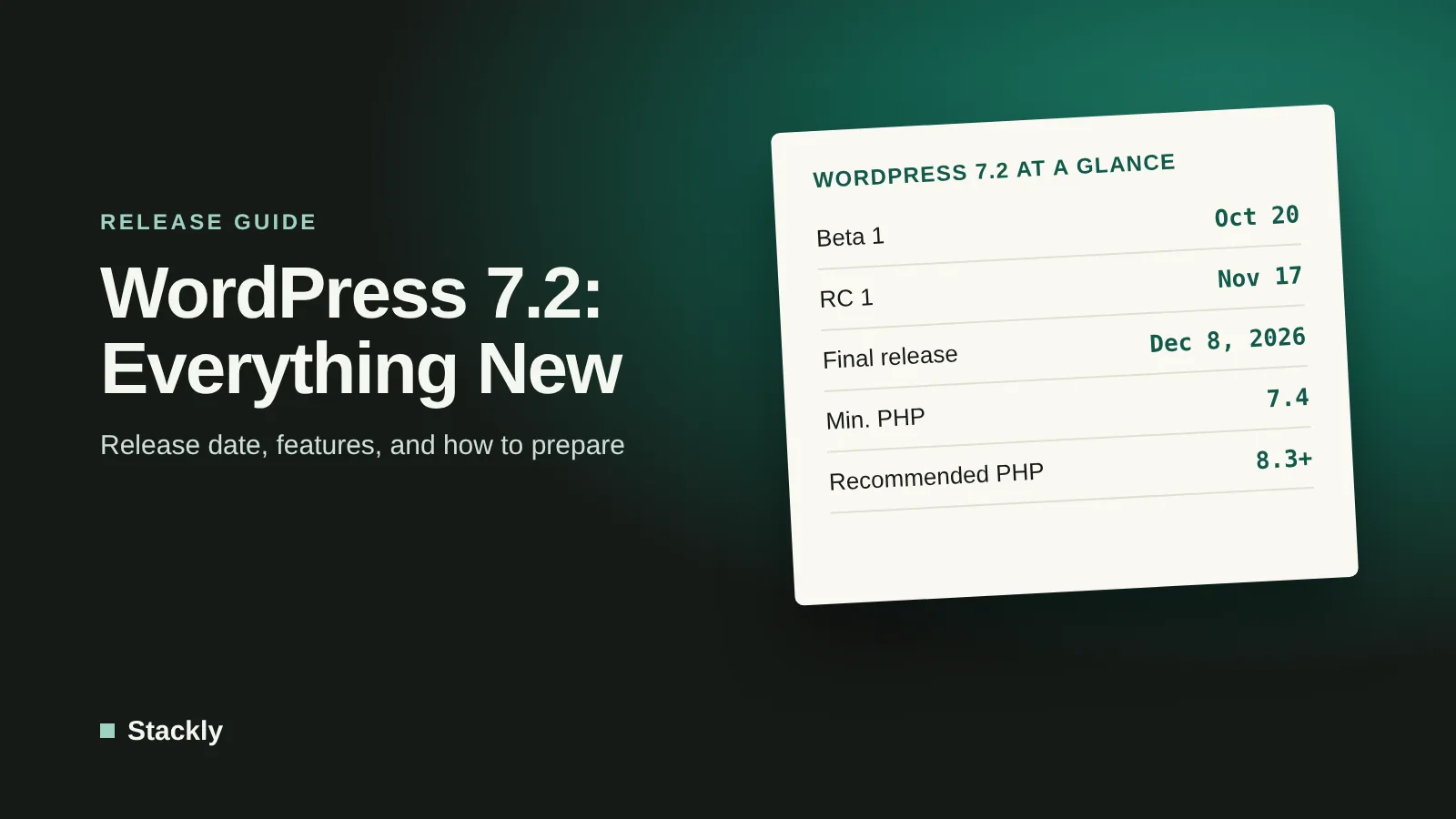
The final release of WordPress 7.2 is scheduled for December 8, 2026, according to the official release schedule. All milestones are planned for 15:00 UTC:
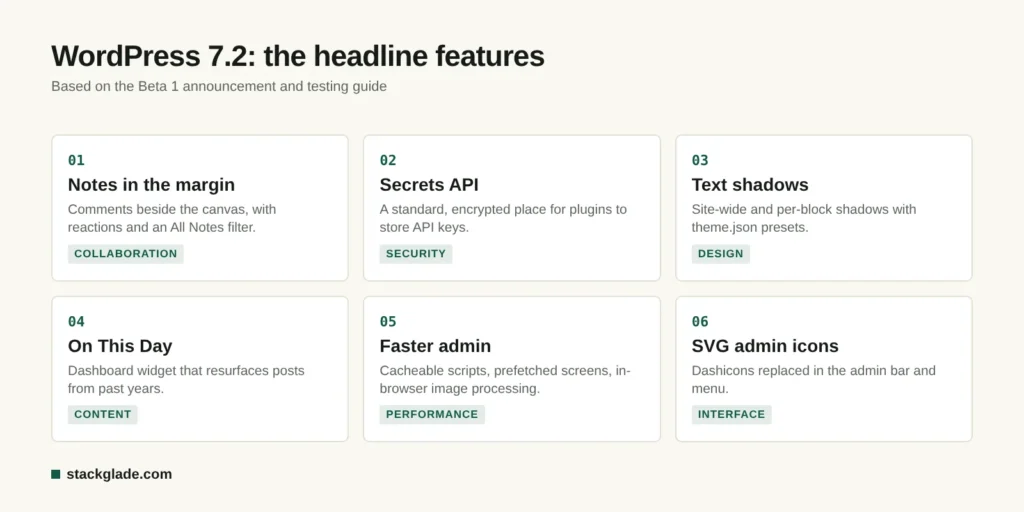
Notes, the block editor’s collaboration feature for leaving comments on content, now appear in a margin beside the editor canvas, so you no longer need to keep the settings sidebar open to read them. The update also adds emoji reactions, a minimized mode, and an “All Notes” filter. For teams that review content before publishing, this makes feedback much easier to follow.
Secrets API for Safer API Keys
Many plugins store API keys and tokens, for example for payment gateways, email services, or AI providers, in ways that vary from plugin to plugin. The new Secrets API gives plugins a standard place to store these secrets, encrypted at rest, with support for key rotation and swappable storage providers. Over time, as plugins adopt it, this should make WordPress sites safer, a welcome change after high-profile security incidents such as the PHP2Shell vulnerabilities in October 2026.
Text Shadows
Designers get new text shadow controls for the whole site and for individual blocks, with presets that themes can define in theme.json. Combined with new text gradients, this gives block themes more typographic options without custom CSS.
“On This Day” Dashboard Widget
A new dashboard widget shows posts you published on the same date in previous years, a handy prompt to update, reshare, or link to older content. For bloggers, refreshing older articles is one of the most effective ways to maintain search traffic.
Faster Admin and Better Performance
According to the testing guide, WordPress 7.2 includes several performance improvements:
Admin scripts and styles now load as individual files, allowing browsers to cache them more effectively.
WordPress fetches the admin screens you are likely to visit next in advance, making navigation feel faster.
Images can be resized, compressed, and converted in the browser before upload, reducing server load and upload sizes.
These changes complement front-end speed work you can do yourself, explained in our guide to speeding up a WordPress site.
Editor and Design Improvements
Responsive style settings, such as setting a different number of gallery columns for different screen sizes.
A “Customized” filter in Global Styles to quickly see what you have changed from your theme’s defaults.
Form element styling in Global Styles.
Duotone filters for whole galleries and site-wide duotone palettes.
Navigation management inside the Site Editor.
A new post settings panel built on WordPress’s DataForm components, still being tested (call for testing).
SVG Icons in the Admin
The admin bar and admin menu are moving from the old Dashicons icon font to SVG icons (details), which look sharper and load more efficiently. Plugin developers who add menu items with Dashicons should check how their icons appear.
Developer Improvements
WordPress 7.2 continues to harden the HTML API and expands the Abilities API, part of the AI infrastructure introduced in WordPress 7.0, and the Interactivity API.
What Was Postponed to WordPress 7.3?
According to reporting by Gutenberg Times, a “suggestion mode” for Notes, which would let collaborators propose edits directly, has been moved to WordPress 7.3. Other features may also shift before release, as is normal during the beta period.
PHP Requirements for WordPress 7.2
WordPress 7.2 does not change the minimum PHP version. Since WordPress 7.0, the minimum has been PHP 7.4, and WordPress recommends PHP 8.3 or greater (WordPress requirements). Given the critical PHP2Shell vulnerabilities patched in October 2026 and the end of security support for PHP 8.2 on December 31, 2026, now is a good time to make sure your host runs a current, patched PHP version.
How WordPress 7.2 Fits With 7.0 and 7.1
WordPress has moved quickly in 2026:
WordPress 7.0 “Armstrong” (May 20, 2026) introduced built-in AI support with an AI Client, a Connectors screen to manage AI providers, and the Abilities API, plus a redesigned admin with a Command Palette, new blocks such as Breadcrumbs and Icons, per-device block visibility, and custom CSS per block. It raised the minimum PHP version to 7.4.
WordPress 7.1 “Mary Lou” (August 19, 2026) added responsive styling, a new media editing window, in-browser image processing with AVIF and HEIC support, Notes attached to specific text with @mentions, and new Playlist and Tabs blocks.
WordPress 7.2 focuses on collaboration, security infrastructure, performance, and design polish.
If you are deciding whether WordPress is still the right platform, our comparison of website builders vs WordPress explains the trade-offs.
How to Test the WordPress 7.2 Beta Safely
Never install beta software on a live website. Use one of these options instead:
WordPress Playground: test in your browser with no setup using this Playground link.
WordPress Beta Tester plugin: on a staging or local site, install the Beta Tester plugin and choose the “Bleeding edge” channel with “Beta/RC Only”.
WP-CLI: on a test site, run wp core update --version=7.2-beta1.
Manual download: use the beta zip file from WordPress.org on a test installation.
If your hosting provider manages updates for you, check their policy; our guide to choosing web hosting explains what managed WordPress hosting includes.
Frequently Asked Questions
When will WordPress 7.2 be released?
WordPress 7.2 is scheduled for release on December 8, 2026, after four beta versions and three release candidates, according to WordPress.org’s official schedule.
What are the main new features in WordPress 7.2?
The headline features are Notes displayed in the margin beside the editor, a Secrets API for storing API keys encrypted, text shadow controls, an “On This Day” dashboard widget, faster admin loading, in-browser image processing, responsive style settings, and SVG admin icons.
Does WordPress 7.2 change the PHP requirements?
No. The minimum PHP version remains 7.4, as set in WordPress 7.0, and WordPress recommends PHP 8.3 or greater for performance and security.
Should I update to WordPress 7.2 immediately?
For simple sites with reputable plugins, updating soon after release is usually fine after a backup. For online stores and complex sites, test on a staging site first and consider waiting for the first maintenance release.
How can I try WordPress 7.2 before it is released?
Use WordPress Playground in your browser, or install the WordPress Beta Tester plugin on a staging or local site. Never run beta versions on a live website.
The Bottom Line
WordPress 7.2 is a polishing release with meaningful upgrades: easier collaboration with Notes in the margin, a safer foundation for storing secrets, faster admin screens, and more design control. Mark December 8, 2026, in your calendar, test the beta on a staging site if you rely on custom plugins, update your PHP version now, and keep a backup ready before you click update.



Leave a Reply